

Reblum AI Review (October 2026): Honest Test by a Fashion Photographer
Affiliate notice: this article contains affiliate links. If you buy Reblum through my link, I may earn a commission at no extra cost to you.
There’s a growing wave of AI-powered retouching tools on the market, and like many photographers, I try to keep up with the latest tech that can help streamline my workflow without sacrificing quality.
In this review I share my hands-on experience with Reblum, an AI portrait retouching app built around natural-looking skin. I've previously reviewed Retouch4Me and Evoto, so this article continues the series with an honest, real-world look at how Reblum performs.
Reblum at a Glance
| My rating | 8.5/10 |
|---|---|
| Verdict | Worth it if you retouch portraits or model images in volume |
| Best for | Fashion, beauty, portrait, wedding, event and e-commerce photographers processing large batches |
| Not for | Product and landscape photographers (no people in the image = no need for Reblum) |
| Main strengths | Natural skin results, backdrop clean, fast batch processing, offline workflow, unlimited exports |
| Main limitation | Not a replacement for Photoshop or high-end retouching; no masking |
| Price | From $11.95/month (billed annually), $24.90 billed monthly, or $249 lifetime licence |
| Free trial | 7 days, unlimited exports |
| Discount code | 20% off with my code TYM.8027 or through my link |
Contents
Is Reblum worth it?
What is Reblum?
How much does Reblum cost? Pricing and discount code
How I use Reblum in my workflow
Reblum pros
Reblum cons
Reblum vs Evoto
Should you try it before buying?
Reblum FAQ
Update log
Is Reblum Worth It?
I think Reblum is one of the most useful AI retouching tools for photographers who process a high volume of portraits and want natural-looking skin without paying per image.
I use it professionally as the first retouching stage of my commercial workflow, before moving on to more detailed work in Photoshop. Its biggest strengths are its natural skin results, fast batch processing, offline workflow (handy because I fly often and don’t always have internet) and unlimited exports. Its main limitation is that I wouldn’t treat it as a replacement for Photoshop.
What is reblum?
Reblum is an AI-powered portrait retouching app designed to speed up repetitive editing while keeping results natural.
I originally used it mainly for skin clean-up, but it has developed quite a bit. When I first published this article in January 2026, Reblum was much more focused on skin. It now includes skin retouching, tone balance, shine removal, teeth whitening, eye enhancement and simple background clean-up.
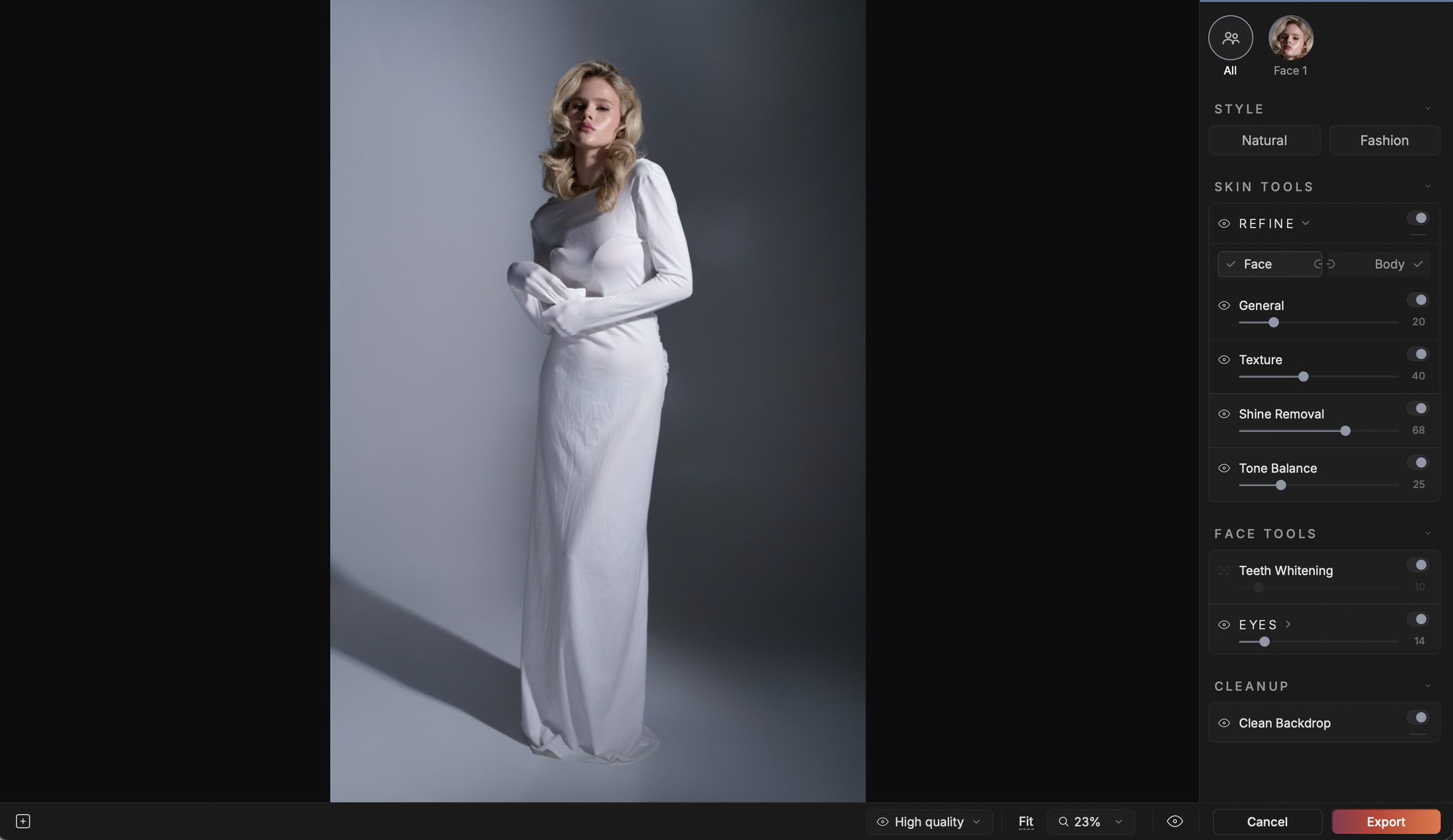
Reblum interface (August 2026)
For me, its strongest features are skin retouching and backdrop clean-up, because these are some of the most time-consuming tasks to do manually.
You can control the retouching separately for the face and body, which is useful for fashion and beauty work where shoulders, arms, décolletage or legs are visible. Reblum also recognises multiple faces in a photograph, so you can retouch everyone together or work on each face individually.
The interface is simple. Instead of hundreds of sliders, Reblum offers a small number of automated adjustments. For skin retouching, the two main controls are General, which sets the overall amount of correction, and Texture, which controls how much visible skin texture is retained.
There are also Natural and Fashion starting styles. I treat them as presets rather than finished results and still adjust the strength depending on the model, lighting and purpose of the image. The Shine Removal and Tone Balance tools are also very useful when used carefully.
To sum up: I don’t use Reblum instead of Photoshop. I use it to deal quickly with the repetitive first stage of retouching before moving on to anything that needs more creative or precise control.
How Much Does Reblum Cost? Pricing and Discount Code (2026)
| Plan | Price | Best for |
|---|---|---|
| Annual subscription | $11.95/monthbilled annually | Regular users who want the lowest monthly cost |
| Monthly subscription | $24.90/monthbilled monthly | Short projects or busy seasons |
| Lifetime licence | $249one-time payment | Long-term users who want to avoid subscriptions |
| Free trial | 7 daysunlimited exports | Testing on your own images |
Prices checked October 2026. Always confirm on the Reblum website, as pricing can change.
Reblum discount code
Use my code TYM.8027 or download the app through my link to get 20% off, whether you choose a subscription or the one-time lifetime licence. That brings the lifetime licence to roughly $199.
Is the lifetime licence worth it?
At $249, the lifetime licence costs about the same as 21 months of the annual plan, or about 10 months of the monthly plan. If you expect to retouch regularly for two years or more, lifetime is the better value. If you’re not sure yet, start at least with the free trial!
How I Use Reblum in My Photography Workflow
Most of the images I retouch involve people, from clean e-commerce portraits and model portfolios to closer beauty and jewellery shots where skin texture is much more visible.
I’ve tested Reblum on a range of images and lighting rather than just a handful of perfect beauty portraits: softer commercial lighting, harder light that reveals more skin texture, close-ups, three-quarter faces and images where more of the model’s body is visible. One thing always holds true, and I’d bet it applies to any AI retouching tool: the cleaner and higher quality the raw file, the more natural the AI retouch.
My typical workflow:
Capture One: initial colour correction, exposure adjustments and image selection.
Reblum: I export the selected photographs and use Reblum for the first stage of skin and backdrop clean-up. This removes a large amount of repetitive work.
Evoto, when needed: for images needing extra portrait adjustments, I sometimes continue in Evoto, because it’s still quicker than Photoshop even though Photoshop has AI tools too.
Photoshop: for final commercial images, precise local corrections such as stray hairs (Evoto can remove them, but not always nicely), detailed skin work, clothing or jewellery clean-up, background adjustments and anything needing more control than an automated tool offers.
On a shoot where I prepare dozens, sometimes hundreds, of photographs, saving even a few minutes per image adds up quickly. Reblum lets me spend less time on repetitive tasks and more on the corrections that genuinely need a photographer or retoucher to make decisions.
For commercial photography, that distinction matters: speed is useful, but only if the final image still looks natural.
What I Liked - Reblum Pros
✅ Unlimited exports
Unlike credit-based platforms such as Evoto, Reblum lets you export unlimited images after purchase. That’s excellent value for photographers editing large batches, such as wedding, e-commerce or event work.
✅ Very natural-looking skin retouching
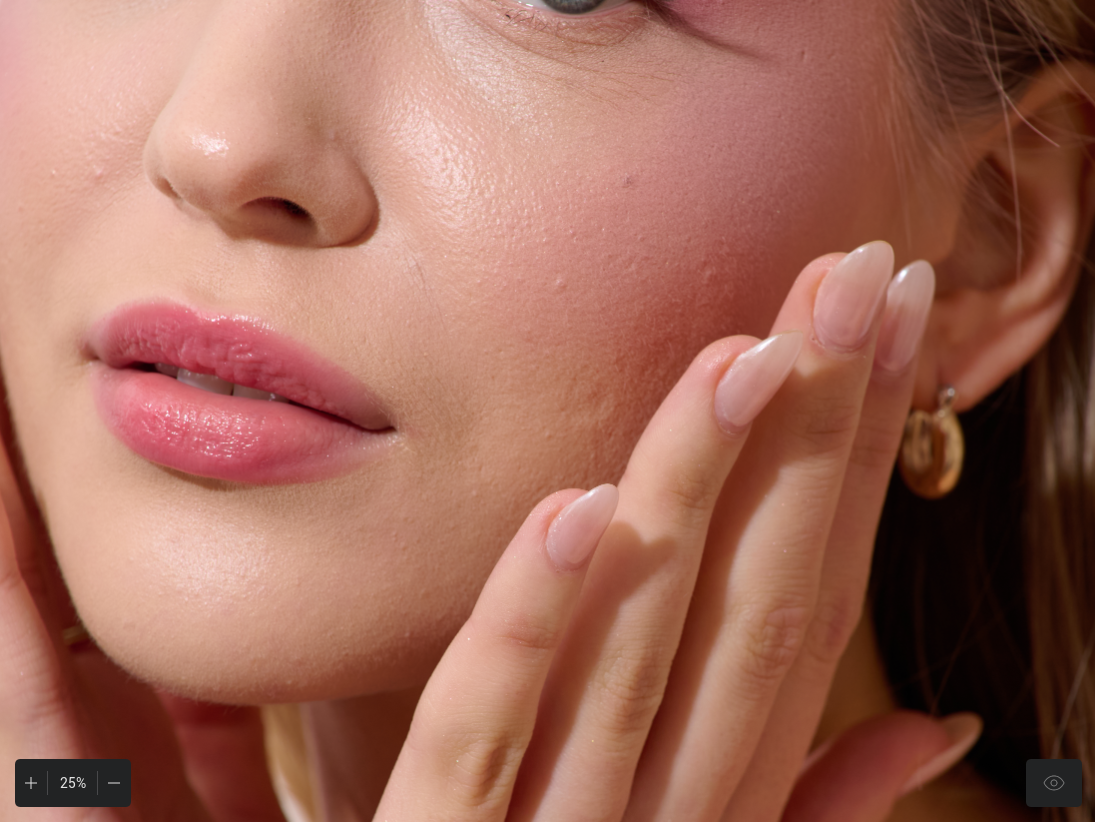
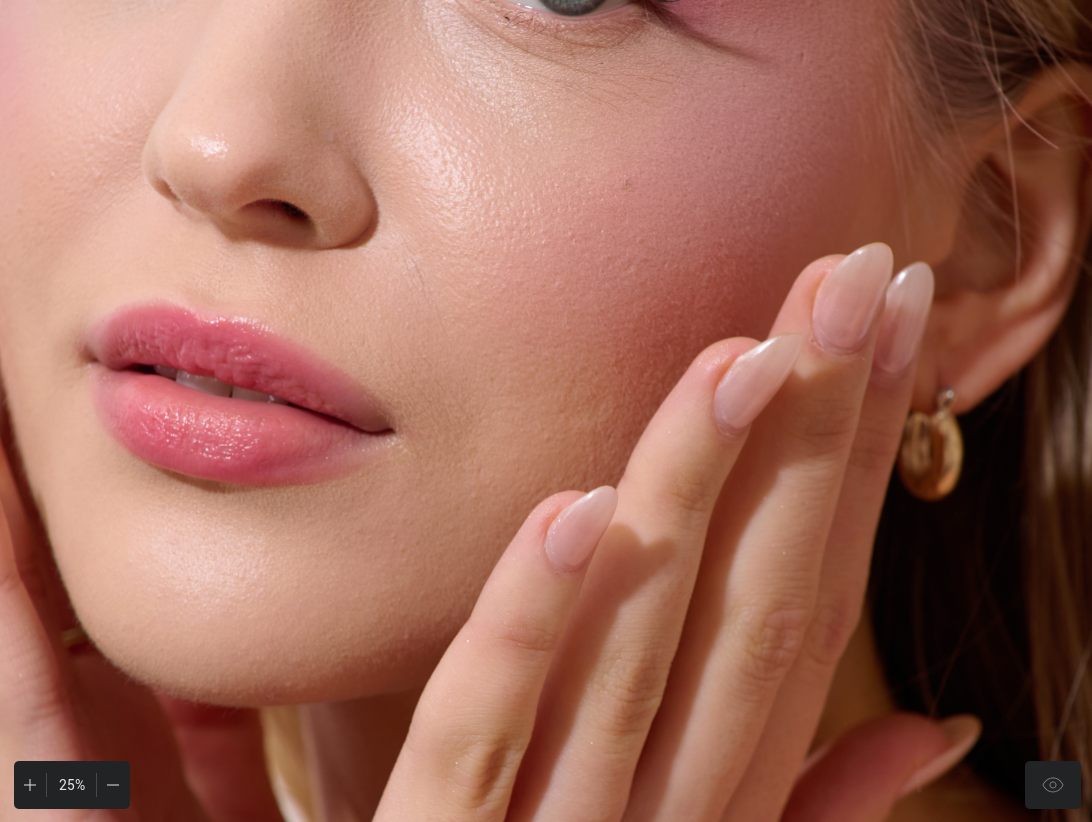
Of all the tools I’ve tested, Reblum delivers one of the most natural results. It avoids the dreaded over-smoothed “plastic” look, and you can adjust the strength of the effects to control how strong the edit looks.
✅ Easy and efficient batch editing
Upload, tweak, batch export, relax. Once your settings are applied to one image, Reblum can apply them to the whole batch. On my machine, applying settings and exporting takes around 15–20 seconds per photo.
✅ Local file processing
No internet connection is required and your files stay on your computer. I found this very handy on a long flight with no internet, and it also matters for client work under NDA or unreleased campaigns.
✅ Integration options
I prefer using Reblum as a standalone app, but it also integrates with Photoshop, Lightroom Classic and Capture One.
✅ Flexible pricing and a generous trial
You can choose a subscription or a one-time licence (see the pricing section above), and the 7-day trial allows unlimited edits and exports, so you can properly test it on real work.
What Could Be Improved – Reblum Cons
❌ No hair tools and limited all-in-one features
Reblum has grown beyond skin, but it’s still a focused portrait tool. It doesn’t handle hair (stray hairs, flyaways), clothing or detailed local corrections. If you want an all-in-one AI retouching suite, this isn’t it (yet).
❌ No masking options
This is a big one for me. You can’t manually mask or limit the effect to certain areas, so the AI applies the retouch to all detected skin, which isn’t always ideal. My workaround is to export from Reblum and blend it with the original in Photoshop using masks. It’s still faster than retouching skin from scratch, but it’s an extra step.
❌ Occasional face detection issues
Like many AI tools, Reblum can struggle when faces are partially obscured, tightly cropped or turned away from the camera. There’s no manual way to “tag” or force face detection, which limits usability for close-ups. That said, in my experience its face detection is more reliable than Evoto’s in these challenging cases.
My Recommendation: Try Reblum Before You Buy It
If you're curious about Reblum, I wouldn't buy it purely because I - or another photographer on the internet - told you it's good.
Download the 7-day free trial and run 20–30 images from a real shoot through it. Include a few easy portraits and a few awkward ones: hard light, hair crossing the face, close crops and visible body skin. You'll understand very quickly whether it suits your photography and your retouching style.
If you’re happy with the results and want to explore it further, you can use my promo code TYM.8027 or download the app through my link ( https://reblum.app/p/TYM.8027 ) to get 20% off, whether you choose the monthly/annually plan or the one-time purchase ✨
Affiliate disclosure: I may receive a commission if you purchase Reblum through my link, at no additional cost to you. I actually use the software in my own workflow, and this review reflects my experience with it - including the bits that occasionally make me swear at my monitor😁
